Google Search Console Verified Clicks: What They Are and Real Results
Learn how GSC verified clicks differ from standard traffic, how they appear in Search Console Performance, and see a real case study: zero organic clicks to 79 clicks in 24 hours.
Most website traffic tools send visitors straight to your URL. That can inflate Google Analytics — but it never touches Google Search Console. Search Console Verified Clicks are different: each visit starts as a real Google search session, ends with a click on your listing, and shows up in the Performance report as an impression and click you can audit.
Why standard traffic never appears in Search Console
Google Search Console only records traffic that originates from Google Search. When a bot or script opens your homepage directly, Analytics may count a pageview, but GSC has no search query, no impression, and no organic click to attribute.
- Direct URL visits → visible in GA4, invisible in GSC
- Referral or social traffic → referral channel in GA4, not organic search in GSC
- GSC verified clicks → real search → SERP impression → click → logged in Performance
If you report SEO progress to clients or stakeholders, that gap matters. Analytics-only charts are easy to question. A Search Console screenshot with queries, impressions, and clicks on your exact URLs is harder to dismiss.
How GSC verified delivery works
- A real browser session opens Google (with geo-targeting matching your campaign country).
- The user searches Google — optionally with your target keyword plus a site: filter for your domain.
- They find your page in the results and click through, the same path a real organic visitor takes.
- They browse your site naturally: scrolling, visiting inner pages, generating engagement signals.
- Google records the search click; within hours it appears in Search Console Performance.
The same sessions also flow into GA4, Shopify, and heatmap tools like Hotjar or Microsoft Clarity — so you get multiple verification points from one campaign.
Case study: from zero organic clicks to 79 in 24 hours
We recently ran a GSC verified campaign on a new site with no prior Search Console activity for the day. Before delivery started, the hourly Performance chart was flat at zero — no clicks, no impressions.
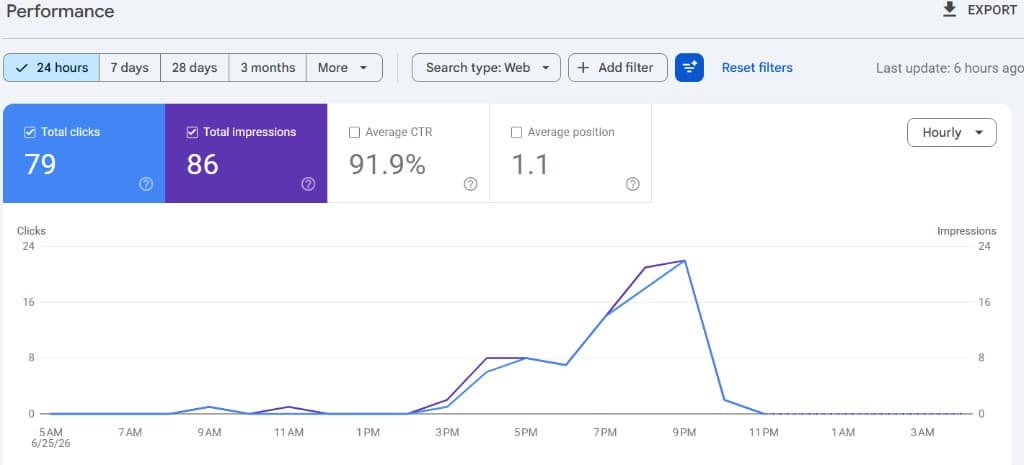
Once verified search delivery went live, clicks and impressions ramped up through the afternoon and evening. Within the 24-hour window the property recorded 79 total clicks, 86 impressions, a 91.9% CTR, and an average position of 1.1 on the URLs in the campaign.
GSC data is not instant. Google batches Performance updates — typically every 6–8 hours. Same-day proof is common once delivery starts, but plan campaigns with that refresh window in mind.
What this case study proves
- A site with zero organic clicks in GSC can show verified search traffic within hours of starting delivery.
- Impressions and clicks rise together — not just Analytics pageviews.
- Hourly granularity in Performance makes the delivery window easy to correlate with your campaign.
- Results are auditable in the same interface Google uses for organic reporting.
Who should use GSC verified clicks?
- SEO agencies that need Search Console proof for client reports
- Founders validating new landing pages or content hubs
- Teams testing whether indexed pages earn search visibility
- Anyone who wants traffic that matches real organic user journeys
How to verify results in your own Search Console
- Open Google Search Console → Performance → Search results.
- Set the date range to the last 24 hours or 7 days and switch to the Hourly view.
- Filter by Page to the URLs in your campaign.
- Compare impressions and clicks before and after your campaign start time.
- Cross-check GA4 and your heatmap tool for scroll and session depth.
GSC verified vs standard traffic pricing
GSC verified clicks cost more than standard direct visits because each delivery requires a successful Google search session — including retries when Google shows CAPTCHA or rate limits. Standard traffic starts at $9.99 per 1,000 clicks. GSC verified delivery starts at $13.99 per 100 clicks, with volume discounts on additional hundreds.
Frequently asked questions
Will this guarantee SEO rankings?
No service can guarantee specific ranking positions — Google's algorithm is proprietary. GSC verified clicks improve the quality of your Search Console data and send search-origin engagement signals, which many site owners use alongside content and technical SEO work.
How fast will I see data in GSC?
Most campaigns show initial impressions and clicks within a few hours. Full delivery depends on order size and duration. Use the Hourly view in Performance to correlate spikes with your campaign window.
Can I target a keyword?
Yes. Optional keyword targeting aligns search queries with the terms you care about — useful for new pages, local landing pages, and content experiments.
Start with 100 verified clicks
The fastest way to test GSC verified delivery on your own property is a 100-click pay-as-you-go order. Enable Search Console verified at checkout, set your URLs and country, and watch Performance over the next 24–48 hours.
Try GSC verified clicks on your site
Start with 100 Search Console verified clicks from $13.99. Real Google search sessions — impressions and clicks you can verify in Performance.