
How Our Traffic Shows Up in GA4: Location, Events & Organic Search
See real GA4 proof: geo-targeted users on the map, engagement events like scroll and session_start, and Organic Search attribution — not the Direct-only traffic most generators produce.
Most website traffic generators inflate pageview counts — but the sessions look wrong under scrutiny. Real-time maps show no geography, event reports stay thin, and Acquisition always says Direct. Get SERP Traffic is built differently: each visit is a real browser session with regional IPs, natural browsing behavior, and — for organic campaigns — a search-origin path that GA4 eventually credits as Organic Search.
What to look for in GA4 (and what fake traffic misses)
- Location — users appear on the Realtime map in the country you targeted
- Events — page_view, session_start, scroll, user_engagement, and first_visit fire like normal visitors
- Source — standard reports attribute organic campaigns to Organic Search, not 100% Direct
- Engagement — time on site and scroll depth show up, not just a single hit and bounce
Below is what we see on a live property during delivery — screenshots you can compare against your own GA4 after starting a campaign.
1. Geo-targeted location in Realtime
When you target a country, sessions should cluster on the Realtime map in that region — not scatter randomly or stay blank. During a US-targeted campaign we watched active users appear across the eastern United States while delivery was running: seven users in the last 30 minutes, with steady minute-by-minute activity on the Realtime chart.
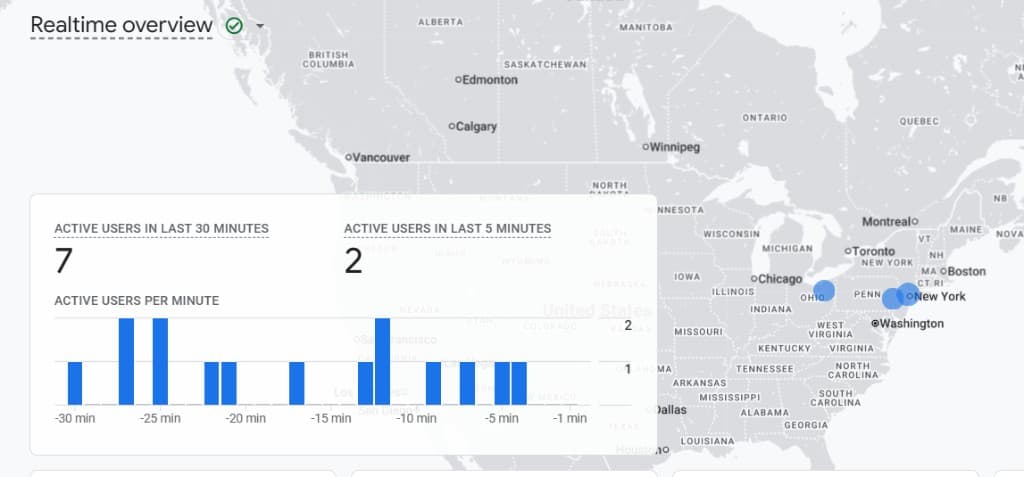
Cheap traffic tools often skip realistic geo routing. If your Realtime map does not match the country you paid for, that is a red flag. Our campaigns use residential-style proxy routing per country so GA4’s geography reports align with your targeting.
2. Real engagement events — not just pageviews
A single pageview with no follow-up events usually means a script hit your URL and left. Healthy sessions generate a mix of GA4’s automatic events. During the same delivery window we captured:
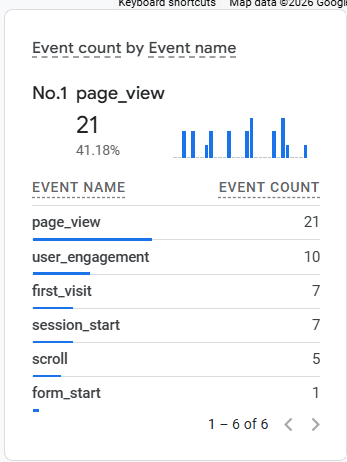
- page_view — entry and inner pages as users browse
- session_start — each visit opens a proper GA4 session
- user_engagement — time-based engagement while the tab is active
- scroll — users scroll down the page like real readers
- first_visit — new users appear when the session is genuinely new to the property
- form_start — optional; fires when a visitor interacts with a form on the page
That event mix is what heatmap and analytics reviewers expect. It is also what makes traffic useful for testing layouts, CTAs, and content — not just padding a vanity metric.
3. Organic Search in reports — not stuck on Direct
Here is the nuance most competitors never explain: GA4 Realtime often labels fresh sessions as (direct) / (none) even when the visit came from Google Search. Google’s reporting pipeline needs time to process referrer and channel data. Check Acquisition the next day — not only Realtime — before you judge attribution.
Important: Realtime may show Direct while a session is live. In standard GA4 reports (Reports → Acquisition → Traffic acquisition), organic delivery is typically reclassified as Organic Search within about 24 hours. Always verify source/medium in daily reports, not Realtime alone.
Typical traffic generators never leave Realtime because every session is a direct URL load — no search step, no referrer chain, no eventual Organic Search row. Our organic traffic type and GSC verified delivery start from a real Google search click-through, so GA4 has the signals it needs to bucket the session correctly once processing completes.
- During delivery (same day) → Realtime: users + map + events; source may still show Direct
- Next day → Traffic acquisition: Organic Search / google grows with your campaign
- GSC verified orders → cross-check Search Console Performance for impressions and clicks
How to verify on your own property
- Start a geo-targeted campaign and note the country and start time.
- Open GA4 → Realtime — confirm users on the map and events like scroll and session_start.
- Do not panic if source shows Direct in Realtime; wait until the next day.
- Open Reports → Acquisition → Traffic acquisition (session default channel group).
- Filter the date range to the delivery window and look for Organic Search growth.
- Optional: enable GSC verified at checkout and compare Search Console Performance the same week.
Standard traffic vs GSC verified in GA4
All paid and free standard campaigns show up in GA4 with location and engagement events. GSC verified clicks add a second proof layer: the same sessions can also appear as search clicks in Google Search Console. If your stakeholder only trusts Analytics, standard organic delivery is enough. If they want Search Console screenshots, toggle GSC verified at checkout.
Frequently asked questions
Why does Realtime say Direct if this is organic traffic?
GA4 Realtime uses lightweight, incomplete attribution. Channel grouping for Google organic search is finalized in batch processing — usually within a day. Direct in Realtime plus Organic Search in next-day reports is normal for search-origin sessions.
Will social or referral traffic show the right channel?
Yes. When you choose social or referral traffic types, UTM parameters and referrer headers align sessions with the Social or Referral default channel group in GA4 after processing — same next-day reporting window applies.
Does free traffic appear the same way?
Free 1,000-visit campaigns use standard delivery: GA4 location, events, and channel reports work the same way. Free traffic is not Search Console verified — paid GSC verified clicks add the Search Console proof layer on top.
Run a test on your site
The fastest proof is your own GA4 property. Order geo-targeted traffic, watch Realtime for map and events the same day, then confirm Organic Search in Acquisition reports the next morning. Need Search Console verification too? Enable GSC verified clicks at checkout and compare both dashboards.
Try GSC verified clicks on your site
Start with 100 Search Console verified clicks from $13.99. Real Google search sessions — impressions and clicks you can verify in Performance.